> For the complete documentation index, see [llms.txt](https://docs.quotesnap.net/llms.txt). Markdown versions of documentation pages are available by appending `.md` to page URLs; this page is available as [Markdown](https://docs.quotesnap.net/main-features/quote-history-widget.md).
# Quote History Widget
The **Quote History Widget** feature allows store owners to provide customers with quick access to their quote history. Configuration options are available under:\
**Navigation: Quote Settings -> Quote History Widget.**
This feature supports:
* **Default Store**: For Direct-to-Consumer (DTC) stores.
* **B2B Store**: For Business-to-Business (B2B) stores.
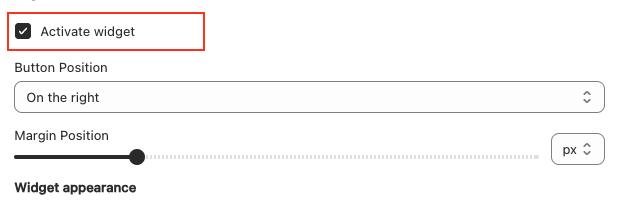
### 1. **Activate Widget**
Enable or disable the Quote History Widget.
* **Activate Widget**: A checkbox to activate the Quote History Widget. If unchecked, the widget will not be displayed on the store.
### 2. **Display Rules**
Control the placement and visibility of the Quote History Widget.
**Options:**
1. **Button Position**: Choose where the widget appears on the page.
* **On the right**: Display the widget on the right side of the page.
* **On the left**: Display the widget on the left side of the page.
* **Next to Cart Icon**: Display the widget near the standard cart icon.
2. **Margin Position**: Adjust the widget’s spacing from other elements by configuring its margins.
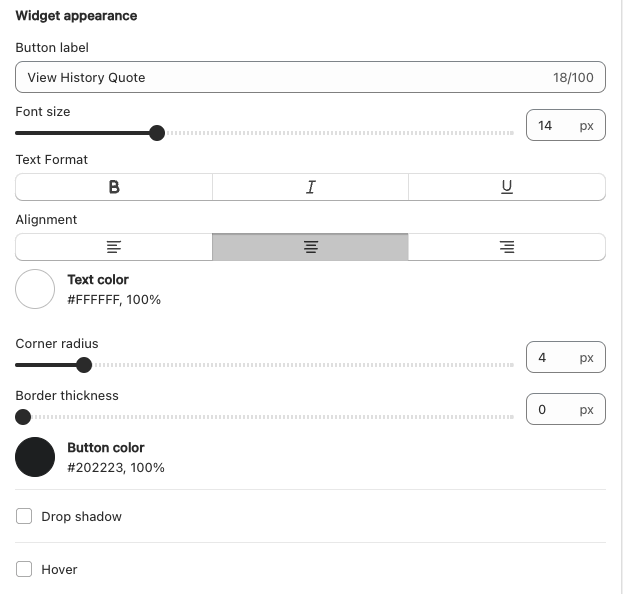
### 3. **Widget Appearance**
Customize the visual style of the Quote History Widget to align with your store’s branding.
**Options:**
* **Button Label**: Define the text displayed on the widget button.
* **Font Size**: Adjust the size of the text.
* **Text Format**: Configure text styling, such as bold or italic.
* **Alignment**: Set text alignment (left, center, or right).
* **Corner Radius**: Customize the roundness of the button’s corners.
* **Shadow**: Add or modify a shadow effect for the button.
* **Hover Effect**: Specify how the button should appear when hovered over.
By configuring these settings, you can ensure the Quote History Widget enhances customer experience by providing easy access to their quote history. For additional support, contact our support team.